Multi-Tabling for Beginners
Learn how to add tables the right way — table layouts, hotkeys, when to scale up, and the mistakes that quietly wreck your win rate as a beginner.
On this page · 6 sections
Multi-tabling is how online players turn a decent win rate into a real income — you simply play more hands per hour. But it is also where a lot of beginners quietly torch the edge they worked hard to build. The trick is not “play more tables,” it is “add tables only as fast as your decision-making can absorb them.” This guide shows you how to scale up without your quality collapsing.
Why multi-tabling works (and when it stops)
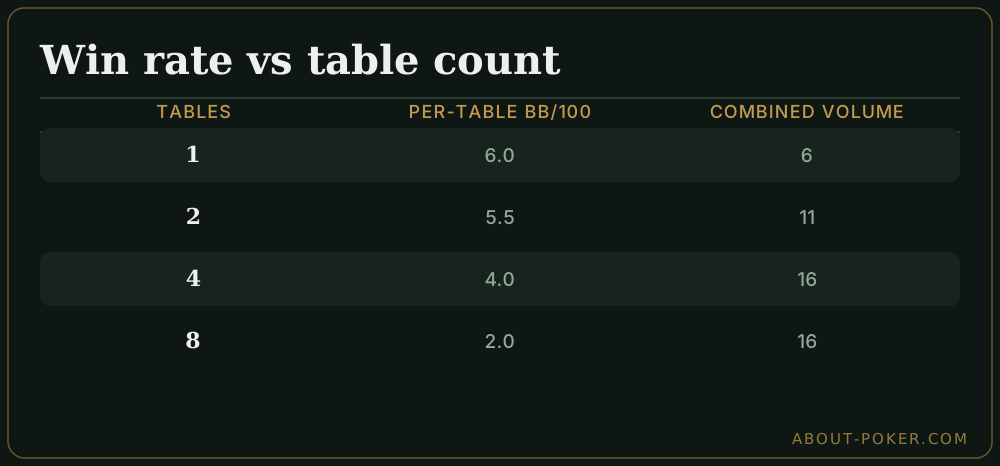
Your hourly profit is roughly your win rate multiplied by the number of hands you play. Playing a second table nearly doubles your hands per hour, so even if each table earns slightly less, your total goes up. That is the whole appeal.
The catch is the word “slightly.” Suppose you win 6 big blinds per 100 hands on one table. If a second table drops you to 5.5 bb/100 each, you are thrilled — you now earn about 11 bb/100 worth of combined volume instead of 6. But if jumping from four tables to eight cuts each table to 2 bb/100, your total (16 bb/100 of volume) barely beats four sharp tables and you are miserable doing it. The goal is to find the point where adding a table still adds meaningfully to the total. Our deeper piece on multi-tabling online poker works through this trade-off for higher volumes.
Set your tables up before you sit
A clean layout is half the battle. For beginners, tile your tables — arrange them side by side with no overlap so every table is fully visible at all times. On a standard monitor, four tables tile neatly into a two-by-two grid. Avoid stacking or cascading (letting tables overlap) until much later, because a hidden table is a table where you miss action.
Turn on your room’s “auto-center” and “table resizing” options so new tables always open in the same tidy grid. Enable the setting that brings the table needing action to the front, and consider a sound cue for “action on you.” Set your default bet sizes as fractions of the pot so you are clicking, not typing, on every street.
Learn a few hotkeys, not all of them
You do not need a fifty-key hotkey profile to start. Learn four: fold, check/call, bet/raise, and “raise pot.” That covers the vast majority of decisions and lets your hands stay off the slow mouse-drag bet slider. Keyboard input is faster and more accurate than dragging a slider across four moving tables.
The reason this matters is time-outs. When four tables demand action at once, seconds vanish. A player fumbling the mouse folds good hands by accident and misclicks bet sizes; a player tapping known keys stays calm. Hotkeys buy you the mental headroom that multi-tabling constantly threatens to steal.
A worked example: scaling from two to four
Imagine you are a solid two-tabler at 25NL cash. You decide to test four tables. For the first session, do not jump straight to four — open three. Play a full session, and afterward check two things: did your VPIP and PFR (the share of hands you play and raise) stay close to your two-table numbers, and did you time out on any hand?
If your stats held and you never timed out, you have proven you can process three tables. Play three for a week, then add the fourth. If instead your VPIP spiked (you were auto-clicking into hands you would normally fold) or you timed out twice, drop back to two and drill the leak. This step-by-step ratcheting is far more reliable than guessing. Because sustained focus is the real bottleneck, pair this with the habits in staying focused online poker.
Common beginner mistakes
- Adding tables to beat boredom, not because you are ready. Boredom is a focus problem, not a volume problem.
- Playing too many tables to fund a bigger sample fast. A big sample of bad decisions is just a big loss.
- Ignoring your stats. If your play-rate creeps up as you add tables, you are auto-piloting. Watch it.
- Skipping breaks. More tables means more fatigue per minute. Take a five-minute break every hour.
- Leaning on a HUD you do not understand. A heads-up display can help at volume, but only once you know what the numbers mean — start with online poker HUD and tools basics.
A simple scaling checklist
Before you add any table, confirm all of these: you finished your last session without a single time-out, your play-rate stats stayed within a point or two of your baseline, your bankroll comfortably covers the extra variance, and you feel sharp rather than restless. When all four are true, add exactly one table — never two at once. Multi-tabling rewards patience far more than ambition, and the players who scale slowly end up playing the most tables of all.
Frequently asked
How many tables should a beginner play?
Start with one table until your decisions feel automatic, then add a second only when you can play it without noticeably slowing down. Most players are ready for 2-4 tables within a few months. There is no prize for playing eight tables badly — volume only helps if your per-table quality holds up.
Does multi-tabling lower my win rate?
Usually a little per table, but it raises your total hourly if the drop is small. The math works when the win rate you lose per extra table is smaller than the extra hands you gain. If adding a table cuts your edge in half, you have gone too far and should scale back.
Should I tile or stack my tables?
Beginners should tile (arrange tables side by side with no overlap) so every table is always visible and you never miss action. Stacking or cascading tables saves screen space but hides information and is better left until you are comfortable and using timing cues and hotkeys.
Do I need two monitors to multi-table?
No. Four tiled tables fit comfortably on a single 1080p monitor, and many winning players use just one screen. A second monitor helps once you play six or more tables or want a HUD and notes visible alongside. Start with what you have.