What Is Poker HUD Popup in Poker?
A poker HUD popup is an expanded stats window that opens when you click a player's HUD. Learn what it shows and how to use it to make better reads.
On this page · 6 sections
A poker HUD popup is an expanded statistics window that appears when you click on a player’s main heads-up display (HUD) panel at the table. The compact HUD on your screen only has room for a handful of the most important stats. The popup is where the rest live — dozens of detailed, situational numbers broken down by street and position — ready for the moment you face a genuinely tough decision and need more than the surface read. Learning to build and use the popup well is one of the biggest upgrades to how you read and use a poker HUD.
What the popup shows
Your always-on HUD typically displays four to eight core stats: VPIP, PFR, 3-bet, aggression factor, and maybe fold-to-c-bet. That is enough to profile an opponent quickly, but it deliberately leaves out the detail so the panel stays readable and does not clutter the table.
The popup fills the gap. Click a player’s box and a window opens with the full stat library: c-bet frequency split by flop, turn, and river; 3-bet broken out by exact position; fold-to-steal from the small blind versus the big blind; check-raise, donk bet, squeeze, river aggression, and more. Everything is there, organized so you can find the one number that answers your current question.
Why the two-tier system exists
The design solves a real tension. If you crammed every stat onto the always-visible panel, it would be an unreadable wall of numbers covering the felt, and you would waste time hunting for the relevant one. If you showed too few, you would lack detail in the spots that matter most. The two-tier system — a lean panel plus a rich popup — gives you speed for routine decisions and depth for critical ones.
In practice you make most decisions off the four or five main stats. The popup is for the high-stakes moment: a big river bet from someone you are unsure about, a 4-bet you were not expecting, a spot where the exact positional 3-bet frequency changes your whole plan.
A worked example
You open from the cutoff with As Qh and the button 3-bets you. Your main HUD shows their overall 3-bet at 8 percent, which looks balanced, so a call or 4-bet both seem defensible. This is exactly when you open the popup.
Inside, you find their 3-bet from the button versus a cutoff open is 14 percent over a solid sample — nearly double their overall number. Buttons 3-bet wider because position is so valuable, and this player leans into it hard. That detail reframes the spot: their button 3-betting range is wide and full of bluffs and speculative hands, so ace-queen is now a comfortable 4-bet or a strong call rather than a marginal fold. The blended 8 percent on your main panel would have hidden this; the positional breakdown in the popup revealed it. Cross-referencing the sample size shown beside the stat confirmed it was trustworthy, a habit that ties directly to reading the full HUD stat set correctly.
How to build a good popup
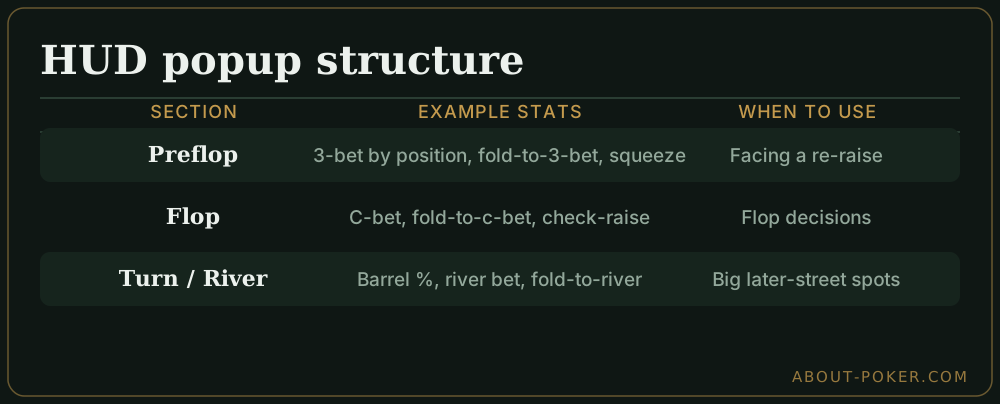
A cluttered popup is almost as useless as no popup, so structure it:
- Group by street. Create tabs or sections for preflop, flop, turn, and river. When you have a river decision, you jump straight to the river tab.
- Break key stats out by position. Overall 3-bet is fine on the main panel; the popup should show 3-bet by seat, since position changes ranges enormously.
- Show sample size beside every stat. A number without its sample is a trap. Put the hand count next to each so you know which readings to trust.
- Cut what you never use. If you have never once acted on a stat, remove it. Every unused number slows down finding the ones that matter.
Common mistakes
The first mistake is never opening the popup at all — treating the main panel as the whole HUD and missing the positional and street-by-street detail that decides close spots. The second is the opposite: obsessing over the popup on every hand, which wastes time and often means you are reading noise from tiny situational samples. The third is a disorganized popup where you cannot find the relevant stat before your time bank runs out. Build it once, thoughtfully, and reserve it for the decisions that are actually worth the extra look.
Quick checklist
- The popup is an expanded stats window opened by clicking a player’s HUD.
- The main panel is for speed; the popup is for depth on tough spots.
- Organize the popup by street and break key stats out by position.
- Always show sample size beside each stat.
- Open it for critical decisions, not every hand.
Frequently asked
What is a HUD popup in poker?
A HUD popup is an expanded window of detailed statistics that appears when you click on a player's main HUD panel. The compact HUD shows a handful of key stats; the popup reveals dozens more, organized by street and situation, so you can dig deeper on an important decision.
How do I open a HUD popup?
In most tracking software you left- or right-click the player's HUD box at the table to open the popup. The exact click and layout are configurable, and you can build custom popup tabs grouping stats by preflop, flop, turn, and river for faster reference.
What stats should be in a HUD popup?
Organize by street. Preflop: 3-bet by position, fold-to-3-bet, squeeze, steal, fold-to-steal. Postflop: c-bet by street, fold-to-c-bet, check-raise, river bet, aggression frequency. Include sample size next to each so you know which numbers to trust.