Online Poker Table Layout Tips
Set up your online poker tables so you never misclick, never miss a decision, and never time out — tiling, stacking, and hotkeys that hold up across many tables.
On this page · 6 sections
Your win rate lives and dies in the two or three seconds you have to act. A messy table layout steals those seconds — you hunt for the call button, you misread which table beeped, you fold the wrong hand because two windows overlapped. A clean layout gives every one of those seconds back. This guide is about the physical arrangement of tables on your screen and the settings around them, which is the unglamorous foundation under everything in multi-tabling online poker.
Tiling versus stacking
There are two core layouts and everything else is a variation. Tiling places every table in its own fixed rectangle with no overlap, so you can see all boards, stacks, and timers at once. It is the better choice whenever your tables fit — you never miss information and you build peripheral awareness of spots developing on tables you are not currently acting on. The limit is screen real estate: on a single 1080p monitor, four tables is roughly the point where cards get too small to read comfortably.
Stacking (also called cascading) overlaps tables and relies on your software to pop whichever table needs a decision to the front. You trade the all-at-once view for the ability to run far more tables than could ever fit tiled. Stacking is a volume tool, not a strategy tool — you see less, so you play closer to a default, GTO-flavored style because you cannot gather live reads on eight hidden tables.
A concrete grid that works
Here is a layout I have used for years for four-tabling cash on a single 1920x1080 monitor. Each table is sized to roughly 950x520 pixels, arranged 2x2 with no overlap, leaving a thin strip at the bottom for the lobby and your tracker. Table 1 is top-left, table 2 top-right, table 3 bottom-left, table 4 bottom-right — the same reading order as a page. Because tables never move and never resize, your hands learn the geography: the fold button on table 3 is always in the same physical location, so you stop looking for it. That muscle memory is worth more than any HUD stat.
When you add a fifth and sixth table, do not shrink all six — switch to stacking with a designated focus zone. Pick one spot, usually center or top-left, where the active table always appears. Every time a table needs action it jumps there, you act, and it returns to the stack.
Settings that prevent misclicks
Layout is not just window positions. Turn on these before you sit down:
- Confirm-all-in / confirm-big-bets. A single misclick that jams your stack costs a buy-in. A confirmation pop on large actions is cheap insurance.
- Disable animations. Card and chip animations add lag between the real state and what you see. Turn them off so the timer you react to is the true one.
- Auto-center on active table if stacking, so the decision always lands in the same place.
- Consistent bet-sizing buttons across tables — set the same pot-fraction presets everywhere so “3/4 pot” is the same button on every table.
Hotkeys tie it together
Overlapping tables move the fold, call, and raise buttons around; hotkeys don’t move. Bind fold, check/call, and raise to keys, and bind two or three bet sizes (say half pot, three-quarter pot, pot) to their own keys. Now your action is decoupled from where the buttons happen to sit, which removes the most common source of layout-related errors entirely. Pair this with the timing discipline in online poker time management so you spend your reaction budget on decisions, not on clicking.
Common layout mistakes
The mistakes I see most from players adding tables too fast:
- Resizing tables mid-session so geography changes and muscle memory breaks. Lock your grid before the first hand.
- Letting tables spawn wherever the client wants. New tables should snap to your grid automatically — most clients and add-ons support this.
- Running more tables than your read quality supports. If your decisions degrade to random when the eighth table opens, your extra volume is losing money, not making it. This is the core discipline covered in multi-tabling for beginners.
- No dead-space buffer. Leave a small gap between tables so a mis-aimed click hits nothing instead of the wrong button.
A pre-session checklist
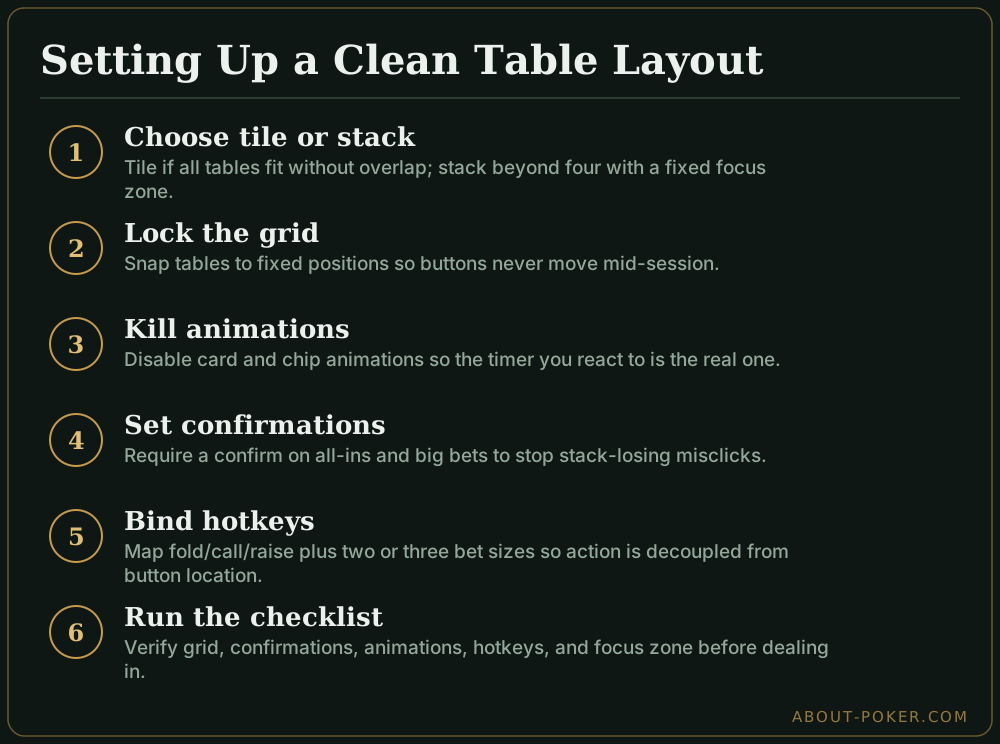
Before you deal in, run down this list: grid is locked and tables snap to it, confirmations on for all-ins, animations off, hotkeys tested on a play-money table, focus zone set if stacking, tracker and lobby out of the click path. Two minutes here saves you from the tilt of a misclicked stack an hour later. A stable, boring, identical-every-day layout is exactly what you want — the excitement should be in the hands, never in finding the fold button.
Frequently asked
Should I tile or stack my online poker tables?
Tile when you can fit every table on screen without overlap — usually up to about four tables on one monitor. Stack (cascade) when you run more tables than fit, so the software pops the active table to the front and you act table-by-table. Tiling shows all information at once; stacking trades that for volume.
How many tables should a beginner run at once?
Start with one, add a second only once you rarely miss a decision, and stop adding tables the moment your win rate or your read quality drops. Most players plateau somewhere between four and twelve depending on format speed. Layout matters more than raw table count.
Do hotkeys actually help with table layout?
Yes. Bet-sizing and fold/call/raise hotkeys let you act without hunting for buttons that sit in different spots on overlapping tables, which is where most misclicks come from. Combined with a fixed grid so tables never move, hotkeys are the single biggest error reducer.
Where should I put the table that needs a decision?
Use your software's option to bring the active table to a fixed focus spot, or arrange a tight grid and let your eyes learn the positions. The goal is that an urgent table always appears in a predictable place so you are never searching while a clock ticks down.